Shopify + Freshly Flow for Batches
Frshly Batch Inventory ticked most of the boxes for our Shopify traceability needs, but it was missing a couple of key features—displaying batch data in the admin and outputting it to our pick lists. With no workarounds from support, I built a custom Shopify Flow to solve the problem.

Earlier this year, we set out to implement better batch tracking and traceability on our Shopify website. Our initial approach was to connect our existing WMS software directly to Shopify, but after some investigation, it became clear that this route would be cumbersome and, quite frankly, painful to execute. After evaluating our options, we opted for a Shopify app called Frshly Batch Inventory.
Frshly checked just about every box we needed for making orders traceable and assigning batches at the point of sale. One of the standout features that sold us on the platform is its ability to automatically discount older, slow-moving lots and then raise prices back up once those lots have been fully allocated. For inventory management and margin protection, this kind of automation is incredibly valuable.
That said, the app does come with one major caveat: you have to work entirely within their interface, which can feel a bit clunky at times. More importantly, there were a couple of key features missing for our particular use case. First, we needed batch data to appear directly on the order page within the Shopify admin. This is essential for our customer experience team when handling returns or investigating order issues. Second, we needed a way to output batch information to our warehouse. We use ShipStation internally to generate pick lists, and since we often carry multiple lots of the same product, having batch details on those lists is critical for accurate order fulfilment.
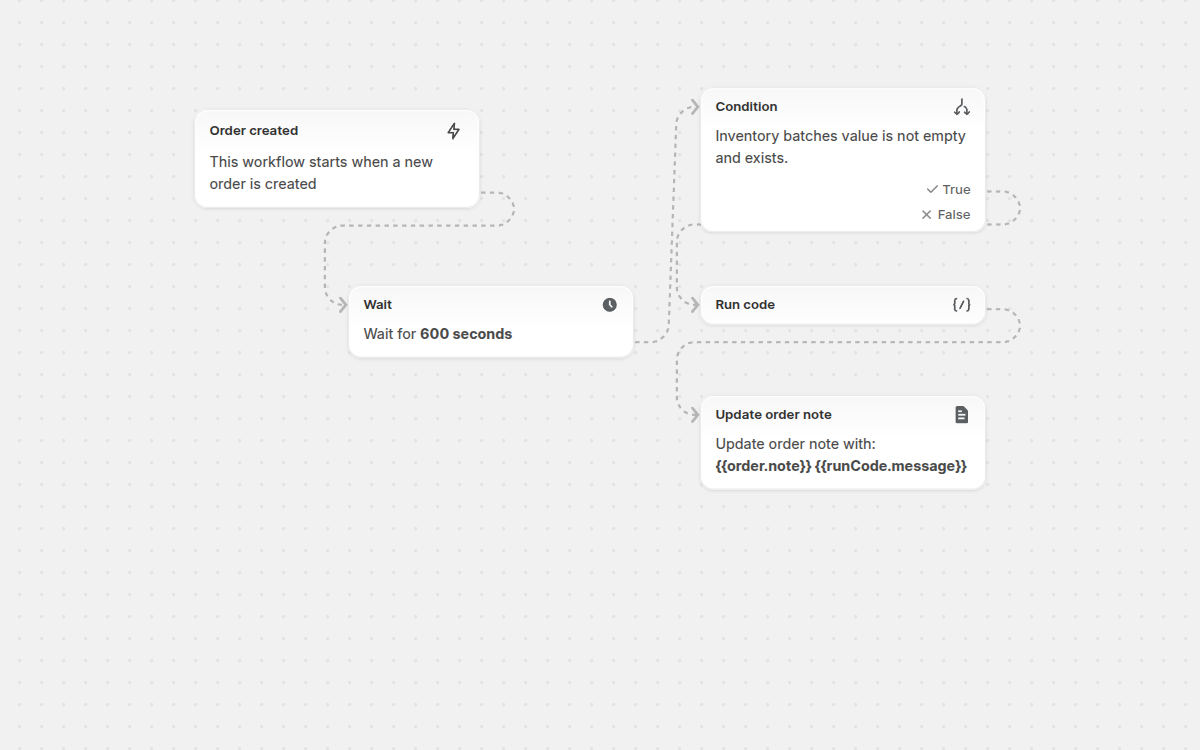
Unfortunately, Frshly's support team wasn't able to offer any suggestions or workarounds for these limitations. So I took matters into my own hands and wrote a custom Shopify Flow to bridge the gap. The flow waits five minutes after an order is placed to account for any changes or webhook traffic, then queries the order metafield that Frshly uses to store batch data. It parses the JSON and appends the relevant batch information to the product's notes field. This simple solution allows our CX team to view batch details directly in the Shopify admin, and since the notes section exports to ShipStation, our warehouse team now has the information they need on their pick lists.
Below is the flow I created—feel free to use it as-is or modify it to suit your own needs.